Hi @paul can you perhaps give me a little more information so that I can reproduce the bug for myself in order to fix it?
rosslynnie
•
Feb 22, 2024
I'm having this problem as well, basically I think it's when you have more than one budget book, change one of them to another default currency, then it affects another budget book somehow. My budget book is showing a very strange addition sum-default is set to GBP, but the numbers are added to JPY values (still showing as GBP though)-maybe because another budget book is currently set to JPY. Baffling.
rosslynnie
•
Feb 22, 2024
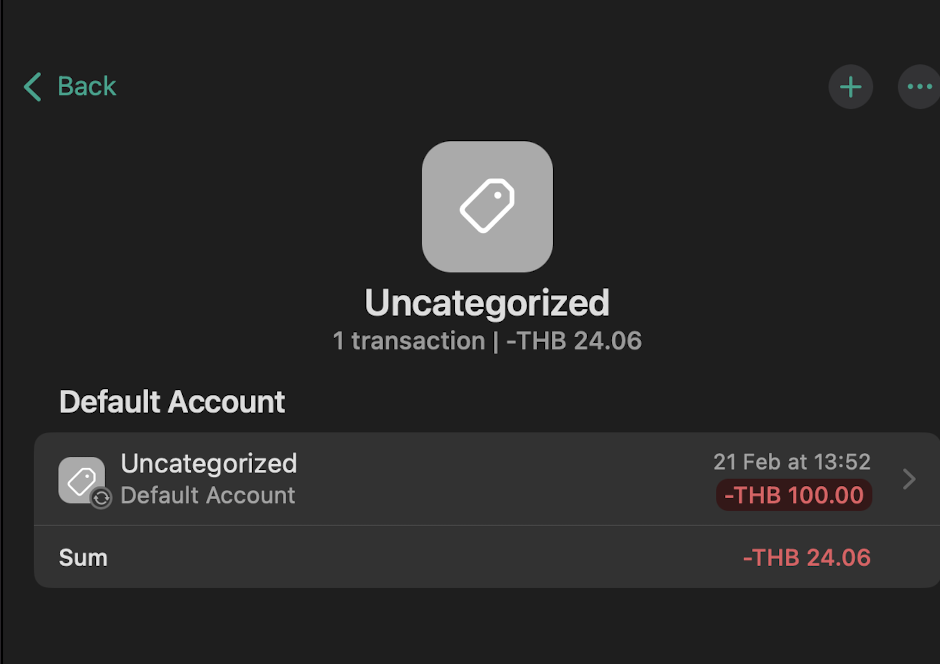
You can see a similar screenshot here. The only reason I can think of why the addition is wildly wrong is because somehow it's converting the numbers to JPY instead (the default in this book is set to GBP)
Fabian
Team•
Feb 22, 2024
Thanks for the tip about the budget book and the different currencies. The default currency refers to all budget books and not just one. However, different currencies for several budget books can be realized by changing the default currency of the respective accounts.
In addition, there was a bug that caused the conversion to be incorrect if you first created transactions and then converted them into a different default currency when switching. Nevertheless, I have fixed this bug for 1.6.0 so that it does not occur again. Unfortunately, to fix the problem, the default currency has to be changed once again after the update to 1.6.0.

Log in to comment and vote
Comments4
Fabian
Feb 22, 2024
Hi @paul can you perhaps give me a little more information so that I can reproduce the bug for myself in order to fix it?
rosslynnie
Feb 22, 2024
I'm having this problem as well, basically I think it's when you have more than one budget book, change one of them to another default currency, then it affects another budget book somehow. My budget book is showing a very strange addition sum-default is set to GBP, but the numbers are added to JPY values (still showing as GBP though)-maybe because another budget book is currently set to JPY. Baffling.
rosslynnie
Feb 22, 2024
You can see a similar screenshot here. The only reason I can think of why the addition is wildly wrong is because somehow it's converting the numbers to JPY instead (the default in this book is set to GBP)
Fabian
Feb 22, 2024
Thanks for the tip about the budget book and the different currencies. The default currency refers to all budget books and not just one. However, different currencies for several budget books can be realized by changing the default currency of the respective accounts.
In addition, there was a bug that caused the conversion to be incorrect if you first created transactions and then converted them into a different default currency when switching. Nevertheless, I have fixed this bug for 1.6.0 so that it does not occur again. Unfortunately, to fix the problem, the default currency has to be changed once again after the update to 1.6.0.