Hi @mhmd21, this is actually the expected behaviour so that the categories are not displayed more than once in the list. However, as this has already been mentioned several times by other users, I have now set this to ‘Planned’ and will adjust it in a future update :)
Herman Leong
•
Oct 18, 2024
Was creating the same feedback topic, so yea, I think people expects the subcategory to show up again even though it’s in the top list already.
Philip Kluewer
•
Jan 9, 2025
I would also prefer to switch off “most used”.
Fabian
Team•
Jan 12, 2025
Hi @Philip Kluewer,
This is already possible via “Advanced settings” => “Show most used categories & tags”. There you can disable the feature.
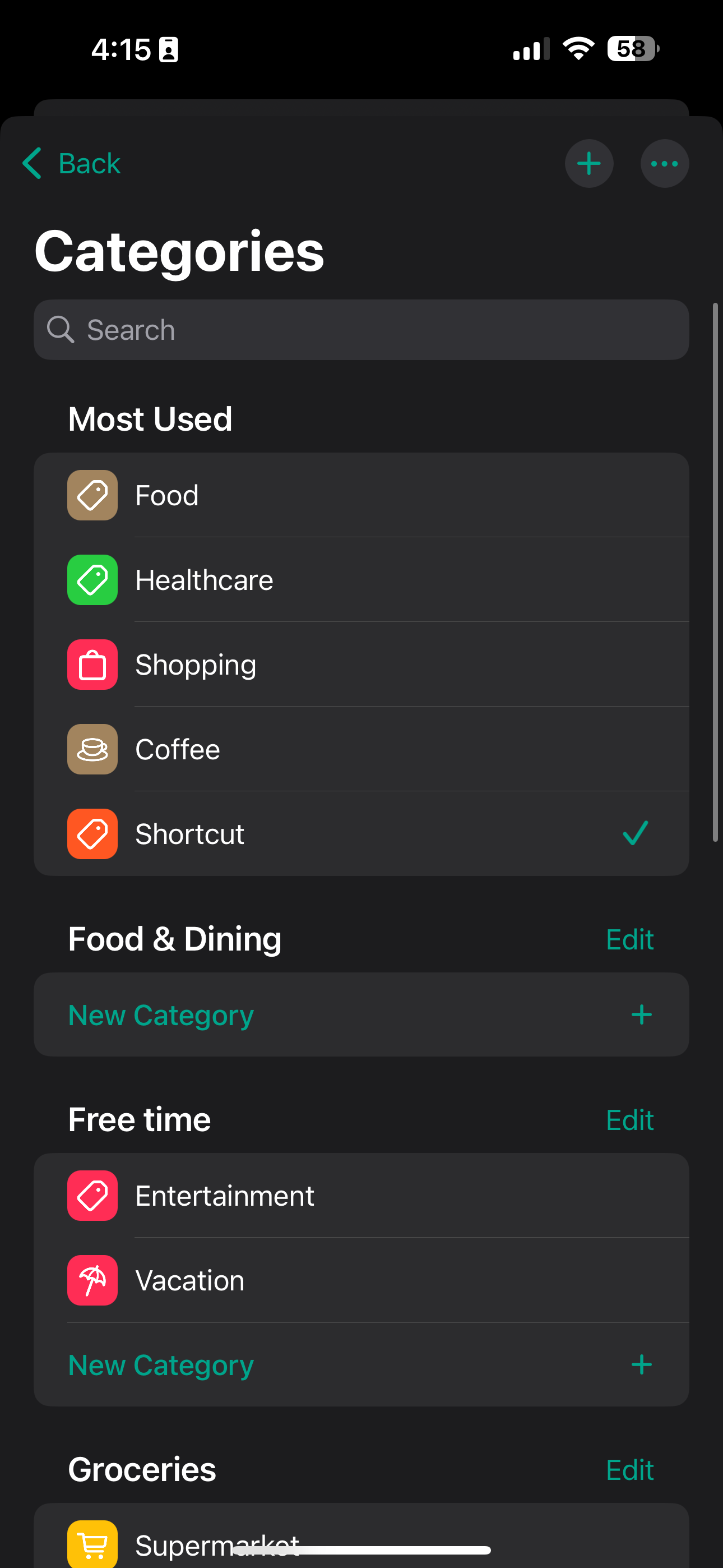
When a category becomes “Most Used” the category gets moved up to the top of the list and is no longer found in the original category types, which becomes confusing
jasonchan
•
May 7, 2025
The most used categories gets moved to the top, which becomes confusing - I prefer a duplicate be listed under most used and then keep the categories in its original locations
Jakub Kašpárek
•
Sep 4, 2025
I agree, I often search at the bottom, but the category jumped up.
Haythem Gataa
•
Dec 6, 2025
Agreed, “Most Used” categories should be duplicated, they need to be treated as shortcuts not be moved around, as this currently messes with users’ muscle memory.
[4.0.0] When selecting categories, the suggestions will be hidden at their regular position
I experienced that BudgetFlow will give me suggestions on which category to pick based on usage. One problem I see here is, that the categories from the suggestions will only be shown at the top with the other suggestions, but not at their regular directory anymore. This leads to "missing" categories when scrolling through all categories. They should be visible at their regular directory as well as with the recommended ones.
In the Category Analysis section, charts are not displayed correctly on iPhone.
In the Categories section, when selecting a category:
The category moves to “Frequently Used” (displayed at the top).
At the same time, it disappears from its original folder.
All of these issues are clearly visible in the provided screenshots.
randywombat
•
Aug 27, 2025
Aren’t these both intended behaviour?
I don’t quite understand the first complaint, it seems to be working fine.
For the second, the list of frequently used categories is provided as a convenience so you don’t have to scroll down through the whole list every time.
[4.0.0] Keep categories tags under their category folder
Currently, when you add multiple receipts and/or expenses in a row, the ones you've selected are grouped under the Recently Used category.
While it's good to be able to quickly select from the recently used categories (even though the last 3 categories might be enough), I don't think they should disappear from their original section.
See the attached screenshot.
Jung-Ching Yeh
•
Apr 7, 2025
Agreed! It also confused me when those categories disappeared from where they originally were.

Log in to comment and vote
Comments15
Fabian
Sep 7, 2024
Hi @mhmd21, this is actually the expected behaviour so that the categories are not displayed more than once in the list. However, as this has already been mentioned several times by other users, I have now set this to ‘Planned’ and will adjust it in a future update :)
Herman Leong
Oct 18, 2024
Was creating the same feedback topic, so yea, I think people expects the subcategory to show up again even though it’s in the top list already.
Philip Kluewer
Jan 9, 2025
I would also prefer to switch off “most used”.
Fabian
Jan 12, 2025
Hi @Philip Kluewer,
This is already possible via “Advanced settings” => “Show most used categories & tags”. There you can disable the feature.
Philip Kluewer
Jan 14, 2025
Great, thanks for the update!
mhmd21
Feb 20, 2025
@Fabian any updates regarding this? :)
jasonchan
Oct 26
•Merged request
•12 votes
[4.0.0] Most Used Categories get moved
When a category becomes “Most Used” the category gets moved up to the top of the list and is no longer found in the original category types, which becomes confusing
jasonchan
May 7, 2025
The most used categories gets moved to the top, which becomes confusing - I prefer a duplicate be listed under most used and then keep the categories in its original locations
Jakub Kašpárek
Sep 4, 2025
I agree, I often search at the bottom, but the category jumped up.
Haythem Gataa
Dec 6, 2025
Agreed, “Most Used” categories should be duplicated, they need to be treated as shortcuts not be moved around, as this currently messes with users’ muscle memory.
Dennis Otto
Oct 26
•Merged request
•4 votes
[4.0.0] When selecting categories, the suggestions will be hidden at their regular position
I experienced that BudgetFlow will give me suggestions on which category to pick based on usage.
One problem I see here is, that the categories from the suggestions will only be shown at the top with the other suggestions, but not at their regular directory anymore.
This leads to "missing" categories when scrolling through all categories.
They should be visible at their regular directory as well as with the recommended ones.
Maxim Hristiy
Oct 26
•Merged request
•2 votes
[4.0.0] Issues with Categories and Charts Display
In the Category Analysis section, charts are not displayed correctly on iPhone.
In the Categories section, when selecting a category:
The category moves to “Frequently Used” (displayed at the top).
At the same time, it disappears from its original folder.
All of these issues are clearly visible in the provided screenshots.
randywombat
Aug 27, 2025
Aren’t these both intended behaviour?
I don’t quite understand the first complaint, it seems to be working fine.
For the second, the list of frequently used categories is provided as a convenience so you don’t have to scroll down through the whole list every time.
Fabio
Oct 26
•Merged request
•7 votes
[4.0.0] Keep categories tags under their category folder
Currently, when you add multiple receipts and/or expenses in a row, the ones you've selected are grouped under the Recently Used category.
While it's good to be able to quickly select from the recently used categories (even though the last 3 categories might be enough), I don't think they should disappear from their original section.
See the attached screenshot.
Jung-Ching Yeh
Apr 7, 2025
Agreed! It also confused me when those categories disappeared from where they originally were.