[2.1.0] Schedule transaction for last Friday of the month

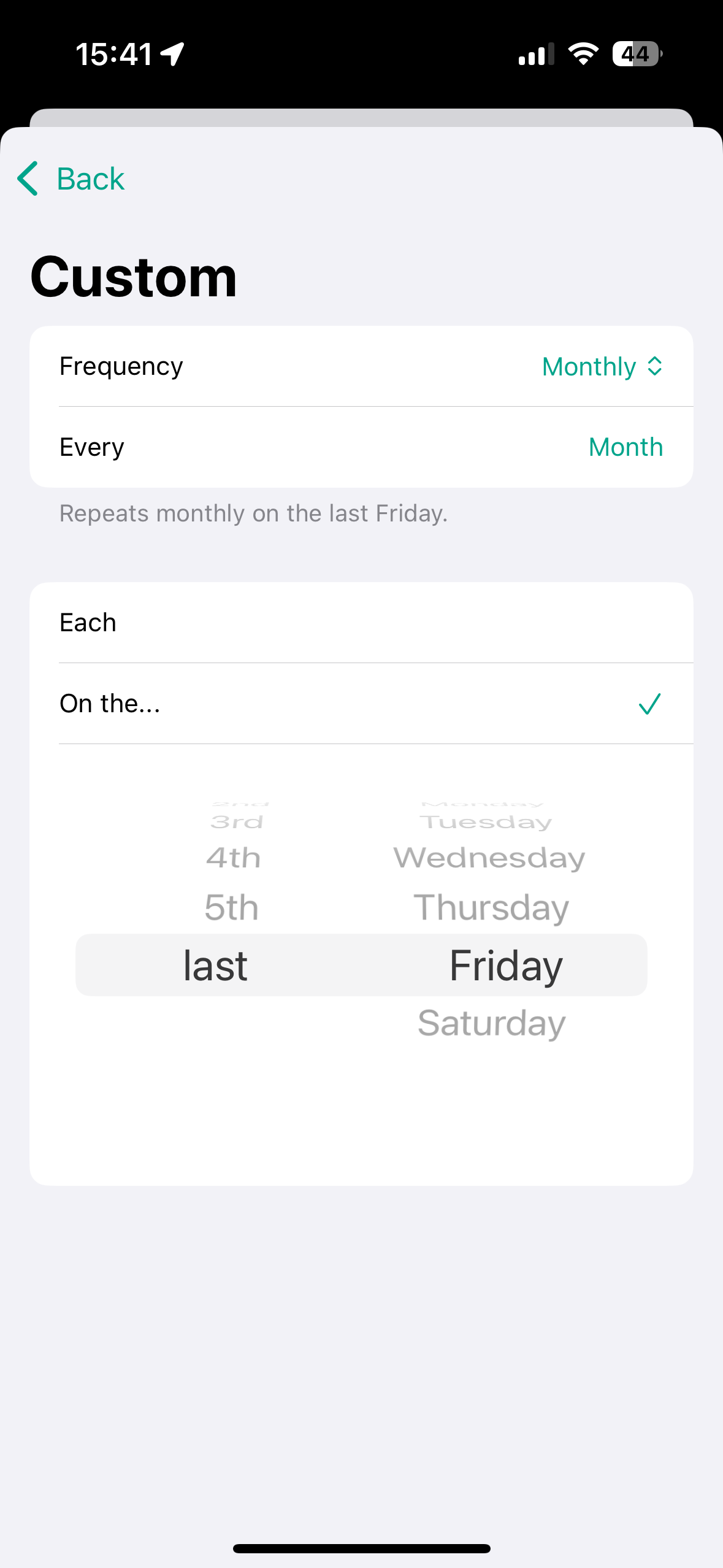
Specific example but reapplicable for other scenarios. I want to schedule my salary pay which is always on the last Friday of the month. I don’t think this is currently possible in any way.
Upcoming Version 2.1.0:
Log in to comment and vote
Comments5
Fabian
Dec 15, 2024
Hi @ALEJANDRO LÓPEZ ALBERTOS,
thank you for your suggestion for improvement. Unfortunately, this is not yet possible.
However, I am already working on the next major update (2.1.0). From then on, it will be possible to define recurring transactions even more flexibly. I have attached a screenshot of the current status. The update is planned for the end of December 24 / beginning of January 25 :)
ALEJANDRO LÓPEZ ALBERTOS
Dec 15, 2024
Love that!! Thanks for the quick reply and for the great app in general. Only app I have ever put any money on since my first iPhone a decade ago… you’re very talented, keep them coming :)
ALEJANDRO LÓPEZ ALBERTOS
Dec 16, 2024
Hey Fabian, I just realized something. I actually get paid on the 24th each month, however, if the 24 is a weekend or a holiday, the pay is on the closest working day before the 24th. I don’t know if this will be possible to setup with the new update, but just wanted to let you know this kind of configuration exists on some companies, maybe it can be helpful for others as well :) Thanks
Fabian
Dec 17, 2024
Thank you so much for your kind words and for supporting my work – it truly means a lot to me! :)
Regarding your question: The "Custom repetition intervals for transactions" feature is designed to cover a wide range of scenarios, similar to how it’s handled in Apple's Reminders or Calendar apps. The specific case you mentioned isn’t currently included in my implementation, but as I’ve encountered something similar (where a paycheck is due on the 15th but is processed on the previous business day if it falls on a weekend or holiday), I may consider adding it as well.
In the meantime, you can manually edit the (planned) transaction to adjust the date to match the actual processing date for that particular case. At least this is how I handle it today :D
ALEJANDRO LÓPEZ ALBERTOS
Dec 17, 2024
That’s exactly how I’m doing it now, it’s not perfect but it does work fine :) thanks for the recco!